


 Winstep Nexus 是一款免費但功能強大的桌面浮動工具列 (dock),讓您只要按一下滑鼠就可存取大多數常用的應用程式。這款專業的桌面浮動工具列軟體,提供使用者完全自訂選項功能,無論要把工具列放在桌面哪個位置、哪個角落或使用什麼圖示、展示什麼特效都可自訂,而且設定起來非常簡單。
這款軟體支援拖放功能、多螢幕、文件縮圖,支援加入虛擬檔案系統物件 (如控制台的項目),而且會自動隱藏、自動收縮。它不僅提供水波、液面、水中倒影等動畫特效,本身在鼠標移到其上時還會放大、搖擺、彈跳等等。再者,這款桌面浮動工具列除了可放置軟體和資料夾圖示外,還提供網路/系統資源監控、天氣預報、時鐘、新郵件通知、螢幕擷圖等相當實用的小工具。
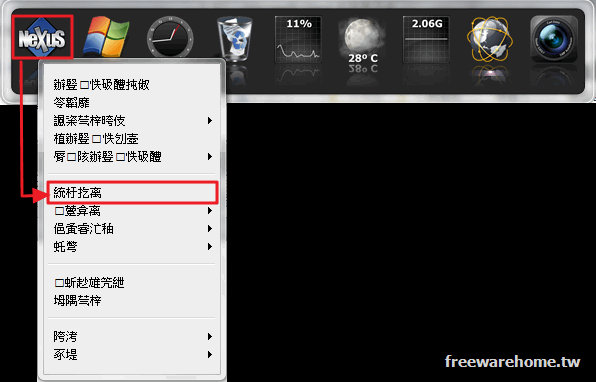
注意:程式安裝伊始雖正確顯示「繁體中文」、但啟動後卻出現簡體中文亂碼。請在 NeXus 圖示上按滑鼠右鍵,並點擊下圖所示的位置開啟「偏好設定」視窗,然後在左上角的下拉式選單中選取「正體中文 (台灣)」,即變成繁體中文介面。
重要諸元:
§ 作業系統:Windows 7/8/10/11 (32 & 64 位元)
§ Winstep Nexus 螢幕截圖 (Screenshot)
§ 官方網站下載頁面
§ 檔案下載
Winstep Nexus 原文簡介:
The program is a FREE professional dock for Windows. With Nexus, your most frequently used applications are only a mouse click away – and Nexus turns working with your computer into a fun and exciting experience.
Nexus provides super fast access to your most frequently used applications, with flexible options allowing it to dock or float anywhere on the screen, providing a myriad of “On Demand” possibilities. From its generous use of situational sensitive context menus to its advanced Drag-n-Drop support, Nexus is not only easy to use – it´s a joy!
There are many options to configure, especially if you’re among the more discerning users. You can change the app’s behavior in relation to context menus, auto-hide, and how it activates.
There’s also quite a generous amount of options related to the dock’s appearance. Make it as small or as big as you like, manage its transparency and color, add some effects, and choose a theme more in line with your preferences. There’s even support for custom sounds, which can lead to some very interesting interactions with the dock.
A dock where form and function are both customizable
The program should make for a good choice for anyone looking for the functionality and design flourish that a dock can provide to their desktop. Owing to its configurable nature, the app enables users to come up with their own docks with minimal effort.
常見問題(FAQ)
Q:Winstep Nexus 是免費的嗎?
A:Winstep Nexus 提供免費版本,是否包含付費功能或進階版本,仍需以官方最新說明為準。
Q:Winstep Nexus 支援哪些作業系統?
A:支援 Windows, macOS, Linux。
Q:Winstep Nexus 適合哪些人使用?
A:適合 需要 桌面工具 功能的使用者,也適合想尋找相關替代工具的讀者。
Q:使用 Winstep Nexus 前要注意什麼?
A:建議先確認版本、系統相容性與授權方式,並優先從官方網站或可信來源下載。